

Your hardware choice is either a silent partner in your success or a liability that could lead to technical disqualification. When the stakes involve earning your law license, "good enough" technology doesn't exist. You need to know right now: can you use a tablet for the bar exam in 2026, or are you investing in a device that the testing authority will reject at the door? The anxiety of a mid-essay software crash is real, but it's entirely preventable with the right technical intelligence.
We understand that you want the portability of a tablet with the power of a workstation. This guide provides the definitive hardware requirements for the 2026 cycle, moving past the confusion of mobile study apps to the rigid constraints of Examplify. You'll learn exactly which devices meet the standard and how to ensure your tech setup mirrors the precision of the JW Bar Method. We'll move from the logistics of compatibility to a structured strategy that guarantees your focus remains on the law, not the laptop. It's time to replace hardware uncertainty with the professional empowerment you need to succeed.
Key Takeaways
- Discover the definitive answer to can you use a tablet for the bar exam by distinguishing between prohibited mobile devices and approved hybrid hardware.
- Understand why standard iPads and Android tablets fail the California State Bar's security protocols, requiring you to pivot to a full desktop operating system.
- Identify the specific "Surface Pro" requirements, including the necessity of a physical keyboard, to ensure your 2-in-1 device is compliant for 2026.
- Learn why running a full-length mock exam on your chosen machine is the only way to guarantee your hardware won't fail during the actual administration.
- Align your technical setup with the JW Bar Method to reduce typing fatigue and ensure your "mental software" is ready for the rigors of California licensure.
The Short Answer: Tablet Compatibility with the 2026 Bar Exam
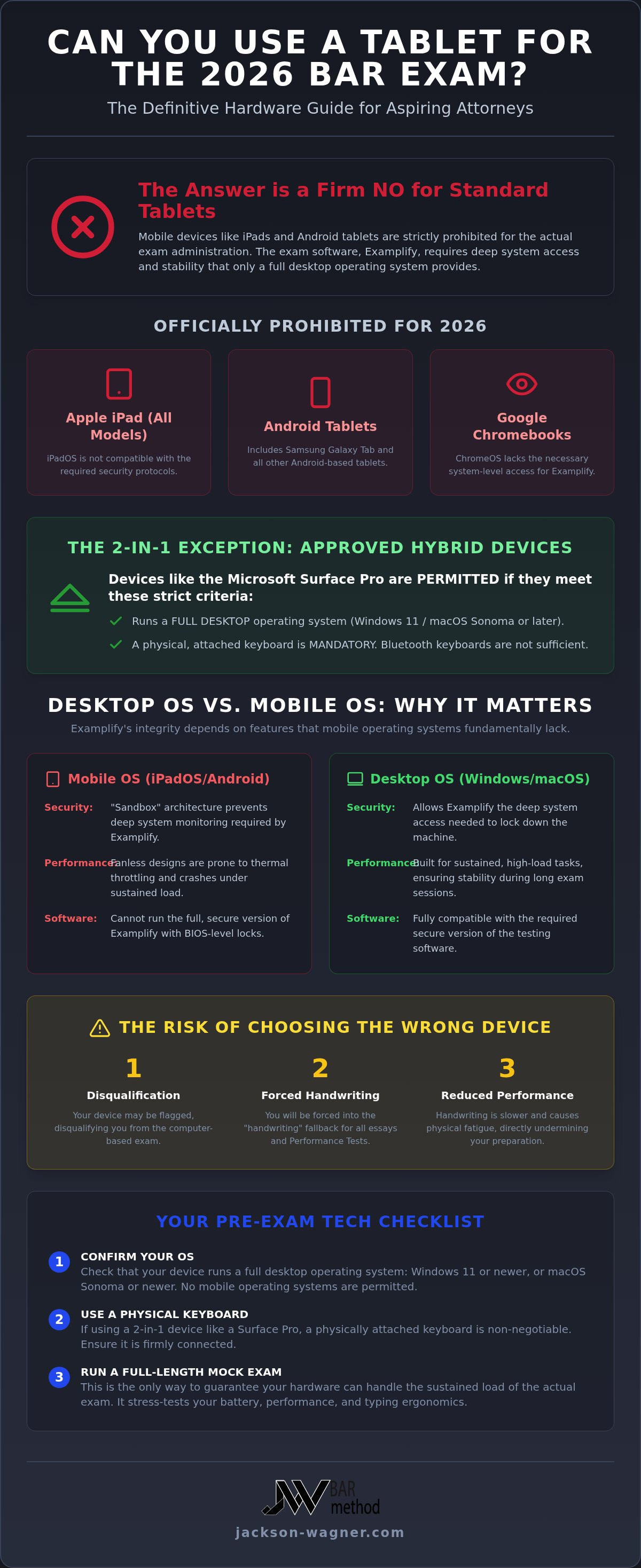
The definitive answer to the high-stakes question, can you use a tablet for the bar exam, is a firm no for standard mobile devices. While tablets are exceptional tools for reviewing flashcards or streaming lectures during your prep, they are strictly prohibited for the actual administration of the California Bar Exam. The State Bar of California enforces these rigid hardware barriers to maintain total system security and prevent software crashes that could compromise your licensure. The exam software, Examplify, requires the deep system access and stability that only a full desktop operating system can provide.
It's vital to distinguish between your study environment and the exam environment. Your study setup might be mobile-friendly and flexible, but your exam day hardware must be a reliable workhorse. The JW Bar Method focuses on precision over volume; that precision starts with a stable technical foundation. Attempting to bypass these requirements with a mobile device is a gamble that no serious professional should take.
Official 2026 Hardware Restrictions
For the 2026 exam cycle, the list of prohibited devices is clear and non-negotiable. If you are still wondering can you use a tablet for the bar exam by using a newer iPad Pro, the answer remains a categorical no. You cannot use any of the following:
- Apple iPad (all models, including Pro and Air)
- Samsung Galaxy Tab and other Android tablets
- Google Chromebooks and devices running ChromeOS
A common misconception among applicants is the "External Keyboard" myth. Many believe that attaching a Magic Keyboard or a high-end Bluetooth peripheral transforms a tablet into a laptop. In the eyes of the Bar, the underlying operating system is the only factor that matters. If your device runs on iPadOS, Android, or ChromeOS, it's disqualified from the start. To ensure compatibility, your machine must run Windows 11 or macOS Sonoma or later.
The Risk of Technical Disqualification
Choosing the wrong device isn't just an inconvenience; it's a strategic liability. If your hardware is flagged during the mandatory security upload process, you risk immediate disqualification from the computer-based portion of the exam. This forces you into the "handwriting" fallback, a scenario where you must manually write out your essays and Performance Test. This is a tactical nightmare that leads to physical fatigue and slower output, directly undermining the efficiency you've built during your prep. Minimum System Requirements are the non-negotiable baseline of technical specifications that your hardware must meet to be permitted for use during the 2026 California Bar Exam. We treat your hardware as a component of your overall strategy; if the tech fails, the strategy is compromised. Ensure your machine is as ready as your mind.
Why Most Tablets Fail the California Bar Exam Tech Test
While a tablet is an excellent companion for quick drills or reading outlines, it's a liability during the actual administration of the test. The technical barriers aren't arbitrary; they exist because the "sandbox" architecture of mobile operating systems like iPadOS and Android prevents the deep system monitoring required for high-stakes proctoring. Even if you've wondered can you use a tablet for the bar exam due to the convenience of a modern iPad Pro, the software constraints make it a strategic impossibility for 2026.
High-intensity processing for three-hour essay blocks often leads to thermal throttling in fanless devices. When a tablet gets too hot, it slows down or crashes to protect its hardware. In a professional licensing environment, a frozen screen isn't just a nuisance. It's a direct threat to your performance. Relying on hardware that isn't built for sustained, high-load security protocols is a risk that contradicts a results-oriented approach.
Examplify vs. Mobile OS
The version of Examplify you might use for practice on your tablet isn't the same software you'll use on game day. The full version of the software requires BIOS-level locks to prevent unauthorized access to local files or the internet. Tablets simply don't support these hardware-level security features. To maintain the integrity of the California bar exam, the State Bar requires a "clean" machine that can be fully controlled by the testing software. This level of oversight is only possible on Windows or macOS. If your device can't provide that transparency, you won't be allowed to sit for the exam.
The Ergonomics of Passing
Typing speed is a silent killer on the California Bar. The Performance Test (PT) requires you to navigate a massive library of documents while simultaneously drafting a high-level memorandum. Doing this on a 12-inch tablet screen is a recipe for disaster. The lack of screen real estate makes multitasking nearly impossible, forcing you to waste precious seconds switching between windows.
Our "Precision over Volume" philosophy relies on your ability to execute rapid-fire analysis without technical friction. Standard laptop keyboards offer the tactile feedback and spacing needed for six hours of intense output. Propping up a tablet on a flimsy stand for two days is an ergonomic pitfall that leads to neck strain and decreased focus. To truly master the exam, you need tools that disappear into the background. For those ready to move beyond hardware hurdles and master the law itself, the JW Bar Method Prep provides the mental software necessary for California licensure.
The 2-in-1 Exception: Using a Surface Pro or Hybrid Device
While standard mobile devices are barred, a distinct grey area exists for hybrid hardware. If you're asking can you use a tablet for the bar exam, the answer changes from a "no" to a "qualified yes" when discussing the Microsoft Surface Pro or similar 2-in-1 devices. This exception exists because these machines operate on a full version of Windows rather than a restricted mobile OS. However, simply owning a Surface Pro doesn't guarantee entry; you must meet specific configuration standards to satisfy the State Bar's security protocols for 2026.
The "Surface Pro loophole" relies entirely on the presence of a professional-grade operating system. Unlike an iPad, which uses a sandboxed environment, a Surface Pro running Windows 11 Pro allows Examplify to implement the necessary BIOS-level security locks. You must ensure your device is not running in "S-Mode," a streamlined version of Windows that only allows apps from the Microsoft Store. You must manually "switch out" of S-Mode to install the full version of Examplify, a process that is permanent and must be completed well before the software certification deadline.
Is Your Hybrid Device Eligible?
Before committing to a hybrid setup, verify your hardware against this checklist. Your success depends on a machine that functions as a laptop, not a media device. Your device must meet these baseline standards:
- Operating System: Must be Windows 11 Pro or Home. Windows RT and Windows 10/11 S-Mode are strictly prohibited.
- Physical Keyboard: A detachable or integrated physical keyboard is mandatory. Bluetooth keyboards are often unreliable; a direct magnetic or wired connection is preferred.
- Screen Size: Ensure the display meets the minimum 10-inch requirement, though larger screens are recommended for the Performance Test.
While these devices are technically compliant, the JW Bar Method recommends a traditional "clamshell" laptop for maximum reliability. Hybrid devices introduce additional failure points, such as magnetic keyboard disconnects or hinge instability, which can disrupt your focus during high-pressure essay blocks. If you are questioning can you use a tablet for the bar exam, consider if the portability of a hybrid is worth the potential for a mechanical disconnect during a three-hour session.
Configuration Best Practices
Success on exam day requires more than just compliant hardware. You must proactively manage your device's settings to avoid triggering a "security violation" in the testing software. Disable all background applications, including cloud storage syncs and third-party antivirus tools, before launching Examplify. Additionally, ensure your device is not in "Tablet Mode" during the software launch, as this can interfere with the interface's ability to lock down the system. A 2-in-1 device must function as a clamshell laptop to meet 2026 standards, meaning it must stay in a fixed, upright position with the keyboard attached throughout the entire session. Some jurisdictions may even require you to disable the touchscreen functionality entirely to prevent accidental inputs that could be flagged as suspicious activity.
Tech Check: Preparing Your Hardware for Exam Day Success
Your hardware is a precision instrument, and like any tool in a high-stakes environment, it requires rigorous validation before use. The State Bar of California mandates a "Mock Exam" for a reason. This isn't a mere suggestion; it's a critical stress test for your specific configuration. You must run a full-length practice session on your chosen machine to identify memory leaks or software conflicts before they cost you a license. While the definitive answer to can you use a tablet for the bar exam is a firm no for standard tablets, even a compliant laptop can fail if it hasn't been properly vetted.
Power management is equally non-negotiable. You're required to have a dedicated power cord connected throughout the entire administration. Testing on battery power alone is a violation of protocol and an unnecessary risk. You also need a backup plan. If your primary machine fails within 48 hours of the exam, you need a secondary, certified laptop ready to go. Missing the administrative deadlines for software certification or the mandatory upload window is an unforced error that can result in immediate disqualification.
Hardware Stress Testing
Simulating a three-hour essay block is the only way to check for thermal throttling or overheating. During this time, monitor your system's performance to ensure the encrypted exam files don't overwhelm your hard drive. You should avoid all OS updates within 30 days of the state of california state bar exam to prevent last-minute driver incompatibilities. Clear at least 2GB of hard drive space to accommodate the software's security logs and temporary data. When considering can you use a tablet for the bar exam, remember that even approved 2-in-1 devices must pass these same stress tests to be viable.
The 'Clean Machine' Protocol
Examplify is designed to be intrusive. To ensure a smooth launch, you must remove VPNs, third-party antivirus software, and communication apps like Slack or Discord that can trigger security violations. Verifying your webcam and microphone is essential for the hybrid proctoring environments expected in 2026. This technical hygiene ensures your "mental software" can function without distraction. For those seeking the best bar exam preparation service, focusing on precision-based strategy is the next step. Once your tech is locked down, you can master the law with Jackson-Wagner LLC Bar Method Prep to ensure your performance matches your preparation.
Beyond the Hardware: Why the JW Bar Method Outperforms Tech Prep
Hardware is merely the vessel for your expertise. While understanding can you use a tablet for the bar exam is a necessary logistical step, your device does not determine your score. Your strategy does. The JW Bar Method acts as the essential mental software for California licensure, transforming how you process and output legal analysis. We move beyond the industry's obsession with mindless volume, focusing instead on the surgical precision required to dominate the 2026 exam cycle. A perfect laptop setup is useless without a methodology that prioritizes high-impact results over endless typing.
Our approach is designed to eliminate the friction between your thoughts and the screen. By mastering specific pedagogical structures, you reduce the physical and mental strain that leads to mid-exam burnout. We assume the financial risk of your performance through our binary guarantee, allowing you to focus entirely on execution. This level of bold reliability is what separates a modern, student-centric prep track from legacy models that leave your success to chance. Your tech should be invisible; your mastery must be absolute.
Precision Over Volume
The California Bar Exam is notoriously taxing, but much of that fatigue is self-inflicted by volume-based study habits. The JW Bar Method teaches you to write higher-scoring essays with significantly fewer keystrokes. We emphasize quality and structural accuracy, ensuring that every word you type serves a specific scoring objective. This "Precision over Volume" philosophy is especially critical for busy professionals on our accelerated prep tracks. Whether you are tackling the Full Bar or meeting specific requirements for the Attorney's Exam, our goal is to get you to the finish line with maximum efficiency and zero wasted effort.
The Path to Licensure
Success requires a seamless integration of your physical tools and your study schedule. Once you have secured a compliant laptop and verified its settings, your focus must shift to the rigorous demands of the curriculum. For out-of-state practitioners, understanding the california attorney's exam requirements is the first step toward a localized career. Modern tools like the JW Bar Method provide the structure you need to navigate these hurdles without the stress of traditional, bloated prep courses.
Don't just take the exam; master it. Your hardware is a tool, but your preparation is your legacy. By choosing a results-oriented partner like Jackson-Wagner, you ensure that your technical setup and your legal strategy are perfectly aligned for 2026. It is time to replace high-stakes anxiety with the confidence of a proven, professional methodology. Secure your future by investing in a prep track that is as agile and innovative as you are.
Secure Your 2026 Licensure Strategy
You now have the definitive answer to can you use a tablet for the bar exam: unless it's a properly configured hybrid running a full desktop OS, the answer is a categorical no. Your success depends on a hardware setup that meets the 2026 technical mandate and a study strategy that prioritizes precision over mindless volume. By locking down your tech early and stress-testing your machine with a full-length mock exam, you eliminate the risk of technical disqualification and focus your energy where it belongs.
As California licensure specialists, Jackson-Wagner provides the accelerated prep tracks busy professionals need to master the law with surgical accuracy. We assume the risk of your outcome with our binary performance guarantee; this allows you to study with absolute confidence in your path. It's time to replace high-stakes anxiety with a structured, modern route to your law license. Master the California Bar with the JW Bar Method and ensure your performance matches your ambition. You've done the hard work. Now, ensure your tools are ready for the finish line.
Frequently Asked Questions
Can I use an iPad Pro with a Magic Keyboard for the California Bar Exam?
No, you cannot use an iPad Pro for the actual administration of the California Bar Exam, regardless of the keyboard attached. The State Bar requires a full desktop operating system like Windows 11 or macOS Sonoma to support the security features of Examplify. While it's a great tool for prep, it won't be permitted in the testing room. Stick to a compliant laptop to avoid technical disqualification at the door.
Does the 2026 Bar Exam allow the use of a Microsoft Surface Pro?
Yes, the Microsoft Surface Pro is generally allowed because it runs a full version of Windows. However, you must ensure it's not in "S-Mode" and that you have a physical, non-Bluetooth keyboard attached. Many applicants ask can you use a tablet for the bar exam and find the Surface Pro is the only viable hybrid option. Just remember to stress-test the device during a mock exam to ensure stability.
What happens if my laptop crashes during the Bar Exam?
If your laptop crashes, remain calm and notify a proctor immediately. Most modern exam software, like Examplify, saves your work every few seconds to the hard drive. Usually, a simple restart allows you to resume exactly where you left off. If the hardware failure is permanent, you'll likely be required to handwrite the remainder of your essays. This is why having a vetted backup machine is a critical part of a winning strategy.
Can I use a tablet to study for the bar exam even if I can't use it on exam day?
Absolutely. Tablets are exceptional tools for the preparation phase. They're perfect for reviewing flashcards, streaming JW Bar Method lectures, or reading digital outlines during your commute. Using a tablet for study allows for the flexibility that high-achieving professionals require. Just ensure you transition to your exam-day laptop for full-length practice essays so your muscle memory and technical familiarity are aligned with the actual testing environment.
Are Chromebooks allowed for the California State Bar Exam?
No, Chromebooks are strictly prohibited for the California State Bar Exam. The Chrome operating system doesn't allow the deep system-level locks required by Examplify to prevent cheating and ensure a secure testing environment. If you currently rely on a Chromebook, you must secure a Windows or Mac laptop well in advance of the software certification deadline. Don't leave your licensure to chance by bringing unapproved hardware to the test center.
Do I need a touchscreen for the NextGen Bar Exam components?
No, a touchscreen is not a requirement for the 2026 California Bar Exam or any anticipated NextGen components. While some hybrid devices have touch functionality, the exam is designed for standard keyboard and mouse input. In fact, some jurisdictions may require you to disable touch features to prevent accidental inputs. Your focus should be on typing speed and accuracy rather than navigating a touch interface, which can often be slower during high-pressure analysis.
Can I use an external mouse and keyboard with my laptop?
You're generally permitted to use a wired external mouse, but external keyboards are often restricted unless you're using a 2-in-1 device like a Surface Pro. Wireless or Bluetooth peripherals are frequently prohibited due to connectivity risks and security concerns. Always check the specific 2026 administrative rules for California before arriving. A wired mouse can improve your navigation speed during the Performance Test, supporting the precision-based approach we advocate at Jackson-Wagner.
What are the minimum RAM requirements for bar exam laptops in 2026?
For the 2026 exam cycle, the minimum requirement is 8GB of RAM, though 16GB is highly recommended for optimal performance. High-stakes testing software is resource-intensive and can cause performance lags on older machines with insufficient RAM. When considering can you use a tablet for the bar exam, remember that many base-model tablets lack the processing power and memory management of a professional-grade laptop. Ensure your machine has at least 4GB of free hard drive space.


