

Bar exam software can fail at the login, security, device-readiness, browser, or delivery stage, interrupting access or disrupting an exam session. These common technical issues with bar exam software are why practice testing and clear troubleshooting steps matter before exam day.
It’s reasonable to expect the technology behind a high-stakes exam to work smoothly, but a crash, locked account, or incompatible setup can add pressure when time matters. This guide explains how login failures, cyberattacks, device-readiness gaps, software crashes, secure browsers, and digital delivery can affect bar exams, and what preparation may help reduce avoidable disruptions.
Key Takeaways
- Recognize how login problems and cyberattacks can disrupt exam access, and understand why reliable account and security procedures matter.
- Identify the technology and policy preparations that can reduce preventable exam-day readiness problems.
- Learn how practice testing can reveal software stability issues before they interrupt a remote exam.
- Understand how secure browsers and digital delivery shape the exam experience, including the limits they may place on device use.
Exam login failures and cyberattacks
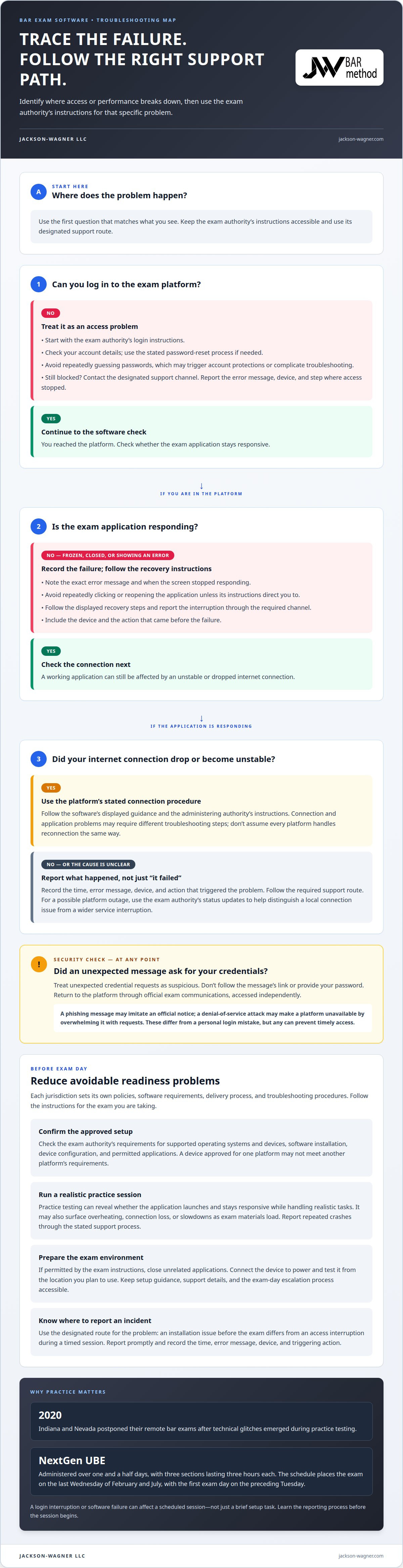
A login failure occurs when you can’t enter the exam platform with your assigned credentials. A mistyped password, incorrect account, or expired session can block access even when the software is working. Start with the exam authority’s login instructions, check your account details, and follow its password-reset process. If you still can’t log in, use the designated support channel and report the error message, device, and step where access stopped.
A cyberattack is an attempt to disrupt a computer system or gain unauthorized access to information. In an exam setting, a phishing message might imitate an official notice and trick you into revealing your password. A denial-of-service attack might make a platform unavailable by overwhelming it with requests. These threats differ from a personal login mistake, but either can prevent timely access. Treat unexpected requests for credentials as suspicious, and access the platform only through official exam communications.
Exam timing makes access problems consequential. The NextGen UBE is administered over one and a half days, with three sections lasting three hours each. The schedule places the exam on the last Wednesday of February and July, with the first exam day on the preceding Tuesday. A login interruption can affect a scheduled session, not just a brief setup task. Keep the exam authority’s instructions accessible and learn how to report access problems before the session begins.
If a login error appears, capture its exact wording and note the time and action that came before it. Avoid repeatedly guessing passwords, which may trigger account protections or complicate troubleshooting. If a message looks like phishing, don’t follow its link or provide credentials. Instead, return to an official channel independently. For a platform outage, follow the exam authority’s status updates and instructions to distinguish a local connection problem from a wider service interruption. Clear reporting helps support teams identify whether the issue involves credentials, the device, or the exam system.
Pre-exam technology and policy readiness
Readiness means matching the exam authority’s rules, software, and device requirements before test day. State-specific instructions determine setup steps, troubleshooting routes, and how candidates report disruptions.
Technical requirements and troubleshooting procedures vary by state bar exam because each jurisdiction sets its own policies and delivery process. Requirements may cover software installation, device configuration, practice tests, permitted applications, and how to report a malfunction. Follow the instructions for the jurisdiction administering your exam instead of assuming another state’s process applies.
Supported operating systems and devices are the computers and software versions approved for a particular exam platform. There isn’t one supported-device list for every U.S. bar exam. The exam authority’s technical requirements specify which operating systems and devices you may use. A laptop that works with one exam platform might not meet another platform’s requirements, so check compatibility against the instructions for your exam.
Setup and Exam-Day Technical Support
Technical support helps with installing, testing, or troubleshooting exam software. The exam authority’s instructions identify the available setup guidance, support channel, and exam-day escalation process. Use the designated route for the problem: an installation issue before the exam differs from an access interruption during a timed session. Keep the relevant instructions accessible so you can follow the right process without searching through unrelated notices.
Reporting Technical Problems
Reporting a technical problem means notifying the designated exam authority or support channel about a software or device failure. A problem might prevent launch, interrupt timed work, or affect submission; the applicable exam policies determine how incidents are handled. Report the issue promptly through the stated method, and record the time, error message, device, and action that triggered it. These details help distinguish a local device problem from a platform issue and give support staff a clearer account.
Remote bar exam software crashes
A software crash occurs when an exam application stops responding or closes unexpectedly. A frozen screen, error message, or sudden return to the desktop can interrupt timed work. The cause may involve the application, device resources, or an unstable connection. Note what happened to help distinguish a software failure from a brief display delay or internet interruption.
Practice testing can expose failures before exam day. In 2020, Indiana and Nevada postponed their remote bar exams after technical glitches emerged during practice testing. That example shows why a mock session is more than a login check: it can reveal whether the exam application launches, remains responsive, and handles realistic tasks on the candidate’s device. Repeated crashes during practice deserve prompt attention through the exam authority’s stated support process.
Wi-Fi or internet failures are handled according to the exam platform’s procedures and the administering authority’s instructions. A dropped connection may interrupt communication with the platform, while a local application crash may require a different troubleshooting step. Follow the software’s displayed guidance and use the designated support route rather than assuming every platform handles reconnection the same way.
During a crash, avoid repeatedly clicking or reopening the application unless its instructions direct you to do so. Record the error message and when in the exam the screen stopped responding. Follow the stated recovery steps, such as restarting the application only if instructed, and report the interruption through the required channel. A clear record helps support staff identify whether the problem involved the device, connection, or software.
Preparation involves more than confirming that the application opens. A practice session can reveal whether the device overheats, loses connection, or slows when exam materials load. Close unrelated applications if the exam instructions permit it, connect the device to power, and test it from the location you plan to use for the exam. These steps can help identify avoidable conflicts, but they can’t prevent every platform outage or software defect.
Secure browser and digital exam delivery
A secure browser is an exam application designed to restrict access to other computer functions during testing. Depending on its configuration, it may prevent you from opening new tabs, switching applications, or using certain shortcuts. These controls help protect exam conditions but also change normal device behavior. A blocked command may be a browser restriction rather than a computer fault.
Digital exam delivery means receiving, completing, and submitting exam materials through an electronic platform. In July, a bar examinee took a multi-hour remote exam. The example illustrates how much the testing experience can depend on your computer, the exam software, and a stable connection. Digital delivery can make exam work possible outside a traditional test room, but you still need to understand the platform’s rules.
Before exam day, read the exam authority’s instructions for installing and launching its secure browser. Use any practice environment provided to learn how the application handles permitted actions, such as moving between exam questions. If the browser blocks an expected action, consult its instructions rather than trying a workaround that could violate exam rules. A practice run can also show whether display settings or accessibility tools work as expected.
During the exam, follow on-screen prompts and avoid switching applications unless the platform permits it. If a browser warning appears, note its wording and follow the prescribed response. Don’t assume that closing and reopening the browser will preserve your work; recovery depends on the platform. At submission, wait for the stated confirmation before leaving the session. If it doesn’t appear, use the exam’s reporting procedure.
Secure-browser restrictions and delivery procedures are set for each exam, so instructions for one jurisdiction may not apply elsewhere. Knowing the permitted workflow can help distinguish a security restriction from a technical fault. For structured preparation nationwide, explore comprehensive bar exam preparation with Jackson-Wagner LLC.
Jackson-Wagner LLC
Jackson-Wagner LLC offers structured preparation through the JW Bar Method for the full California Bar Exam and the California Attorney’s Exam. Its fully online programs provide a guided study path with expert-led instruction, curated materials, and interactive quizzes and assignments with feedback. Candidates can choose a standard or accelerated program suited to their exam and study schedule.
Software troubleshooting follows the exam authority’s procedures and is separate from bar preparation. Jackson-Wagner LLC focuses on preparing candidates for the California Bar Exam and does not provide software support. Explore its full-exam or Attorney’s Exam programs to choose the preparation path that fits your exam.
Build a preparation plan you can rely on
Keep exam logistics and study goals distinct. Follow the administering authority’s technical procedures for software questions, and build your study schedule around the California exam you plan to take. Preparing for common technical issues with bar exam software can leave more room for focused study, but coursework isn’t a substitute for exam-day technical support.
Jackson-Wagner LLC offers JW Bar Method programs for the full California Bar Exam and the Attorney’s Exam, with standard and accelerated options. The fully online courses provide structured preparation for California candidates, while software and exam-policy questions remain with the appropriate exam authority.
Contact Jackson-Wagner LLC to discuss your California Bar Exam preparation. Take the next step with a clear plan and steady focus.
Frequently Asked Questions
What technical issues are most common with bar exam software?
Common technical issues with bar exam software include installation or activation errors, failed logins, connection drops, frozen screens, and secure-browser restrictions. Symptoms can point to different causes: an activation message may indicate an account or setup issue, while a lost connection may involve the network. Note the exact message and when it appeared. This context helps distinguish a device-specific problem from an exam-platform interruption.
How can candidates troubleshoot installation, login, or activation problems?
To troubleshoot common technical issues with bar exam software, follow the exam authority’s setup sequence in order and use its supplied installer and account instructions. If installation fails, note the operating system and error text; for login trouble, confirm you’re using the assigned account before following the official reset process. If activation remains unsuccessful, stop repeating attempts and use the designated support channel. Avoid unofficial downloads or links in unexpected messages.
What should candidates do if exam software crashes or freezes during the exam?
Follow the platform’s on-screen recovery instructions and the exam authority’s incident-reporting procedure. Don’t assume your answers were saved or that restarting is safe. Record the time, visible error, and what you were doing just before the freeze. If the interface still responds, use only the exam’s designated reporting method. If it doesn’t, follow the authority’s instructions for reporting an interruption afterward.
How do exam software security restrictions affect antivirus, firewalls, and other applications?
A secure browser may restrict application switching or other computer functions, while antivirus software and firewalls can affect how programs access files or network connections. The exact interaction depends on the exam software and its configuration. Don’t disable security tools or change firewall settings on your own. Follow the exam authority’s instructions, and report conflicts involving a required program before the exam session.


