

A laptop crash is not the moment to improvise. If you’re wondering what to do if your laptop crashes during the bar, your first priority is to stay calm and follow the exam’s official procedure, even if you’re worried about losing a completed or partially written answer.
That worry is understandable. You may not know whether restarting is allowed, whom to alert, or how a malfunction could affect your time. For the California Bar Exam, applicants whose laptops fail during the exam must request a handwriting packet and submit handwritten responses. Proctors and staff can’t troubleshoot computer problems, and extra time isn’t provided.
This guide outlines what to do first, how to report the problem, and what to prepare before exam day so a technical issue doesn’t leave you guessing. Follow the current instructions from the State Bar and exam software provider. Keep your response simple: alert the appropriate staff, then proceed as directed.
Key Takeaways
- Know what to do if your laptop crashes during the bar, and avoid guessing or taking unapproved steps.
- Alert exam staff promptly and describe what you observed, including what happened just before the failure.
- Separate what you personally observed from what exam staff or the exam authority later confirms about lost work or time.
- Prepare by reviewing the exam authority’s current laptop requirements, software checks, and practice deadlines.
- Build a structured California bar study routine alongside your technical contingency plan. Jackson-Wagner’s online programs provide digital materials and immediate access after registration and payment.
Laptop Crashes During the Bar Exam: What Matters First
Pause. Don’t guess at the cause or start trying fixes while the exam is underway. If you’re deciding what to do if your laptop crashes during the bar, alert the designated exam staff or proctor as soon as possible, then follow the instructions for that administration. A clear, calm report gives staff the information they need to direct you under the applicable procedure.
Procedures can vary by administration and by the instructions candidates receive. Before exam day, read the current official candidate guidance, including what to do if the software stops responding and how to request help. Don’t assume your work will be recovered, that your time will be adjusted, or that restarting is permitted. Wait for direction rather than relying on another candidate’s experience or an online account of a past exam.
What counts as a laptop crash during an exam?
A problem may appear as a frozen screen, an unexpected shutdown, an exam software error message, or a power interruption. These symptoms can have different causes and may not all follow the same remedy. Report what you can see and what happened immediately beforehand. Don’t try to diagnose the hardware or software. For example, say, “The screen stopped responding after I clicked Next,” rather than, “The application corrupted my answer.” Specific observations help staff understand what happened without presenting a guess as fact.
If the display is still visible, note an error message as accurately as you can, but don’t spend time investigating it or take an action that could violate exam rules. Your priority is completing the exam, not troubleshooting a device. General information about the format and administration of bar exams appears in this Bar examination overview, but it doesn’t replace the rules for your specific exam.
Why the proctor or exam staff should guide your next move
Exam staff can tell you which steps are permitted under the current administration’s procedures. Their role is to direct the process, not necessarily repair your computer or recover a response. Don’t leave the testing area, approach another candidate, use a phone, or seek outside technical help unless the instructions or staff authorize it. Even a well-meant attempt to fix the problem could conflict with testing rules.
Before exam day, locate the official candidate instructions and review the section on equipment or technical problems. Learn how designated staff are identified and how candidates are expected to request assistance. If a failure occurs, report the visible symptom and follow the direction you receive. Another applicant’s experience, an old policy, or an assumption about saved work doesn’t confirm what will happen to your answer or remaining time. Keep your first response simple: pause, alert staff, and let the applicable procedure guide what comes next.
Laptop Crashes: A Calm, Immediate Sequence
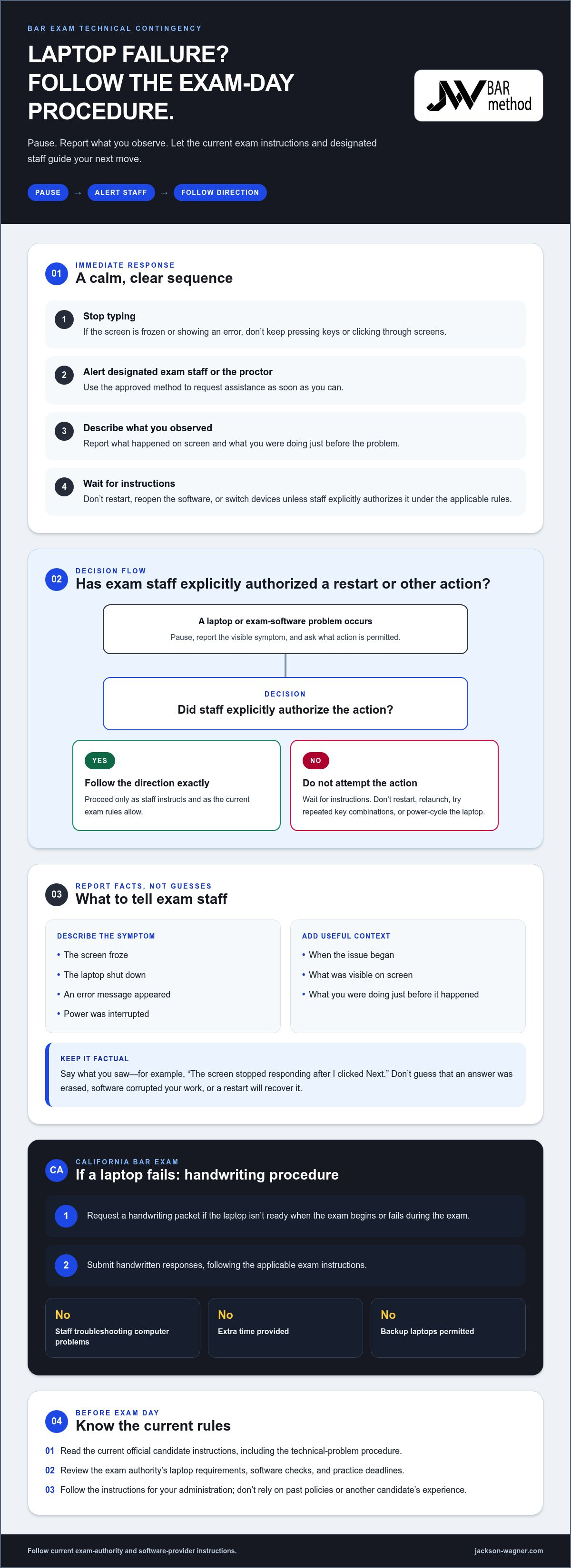
In the first moments after a failure, keep your response simple. Don’t diagnose the laptop while the exam is in progress. Follow the current exam rules and staff directions. A restart, software relaunch, or second device may not be allowed.
- Stop typing. Don’t keep pressing keys or clicking through screens if the computer is frozen or showing an error.
- Alert the designated exam staff or proctor. Use the approved method to request assistance as soon as you can.
- Describe what you observed. Report whether the screen froze, the laptop shut down, an error appeared, or power was interrupted. If possible, mention what was on screen and what you were doing just before the problem.
- Wait for instructions. Don’t restart the laptop, reopen the exam software, or switch devices unless staff explicitly authorizes that action under the applicable rules.
This sequence helps you avoid assumptions about the cause of the problem or the status of your answer. It also gives staff a clear description to work from. A fix that worked during a practice session, or advice from another examinee, doesn’t authorize the same action during the live exam.
Should you restart the laptop or exam software?
Not unless exam staff explicitly authorizes it. Restarting or relaunching could conflict with testing procedures, and you can’t assume it will restore access or protect saved work. Tell staff what happened and ask what action is permitted. If your device is unresponsive, don’t try repeated key combinations or power cycles while waiting for direction.
For the California Bar Exam, the procedure described in the exam guidance is to request a handwriting packet if a laptop isn’t ready when the exam begins or fails during the exam, then submit handwritten responses. Staff don’t troubleshoot computer issues, extra time isn’t provided, and backup laptops aren’t permitted. Read the latest candidate instructions before exam day and follow the rules for your administration.
What information should you give exam staff?
Be brief and factual. Say when the issue began, what you saw on screen, and whether the laptop froze, powered off, or displayed an error. If the failure followed a particular action, such as moving to another screen, mention that too. Don’t say your answer was erased or that a restart will recover it unless that has been confirmed. Reporting symptoms is more useful than guessing at the technical cause.
Stick to what you can observe, then follow the direction you receive. Don’t assume work or time will be restored; wait for the exam authority to clarify what happens next. Outside the exam room, a structured study routine can help keep preparation organized, though it isn’t a technical contingency plan. Jackson-Wagner’s programs are fully online, with digital materials and immediate access after registration and payment.
Lost Work, Time, or Access: What to Clarify After a Crash
After a laptop failure, it’s natural to wonder whether your answer was saved, how much time was affected, or what the exam authority will do next. Separate those questions from what you actually observed. You can report that the screen froze while you were entering an answer. Whether the work was retained or time was affected is for exam staff or the authority to clarify under the current procedures.
If permitted, ask designated staff how the disruption is being recorded and what official follow-up process applies. Don’t assume that a proctor’s immediate instructions determine the final handling of lost work or time. Procedures can depend on the exam administration, so don’t presume a particular remedy or outcome.
How to record what happened without disrupting the exam
During the session, follow staff directions before making notes. If note-taking is allowed and practical, keep it brief: record the approximate time, the visible symptom, and the instruction you received. Don’t photograph the screen, copy exam content, or use a personal device unless the rules expressly permit it. After the exam, write a neutral account while the sequence is fresh, if appropriate under the candidate instructions.
Use concrete observations rather than conclusions. For example, note that “the screen stopped responding after I moved to the next question,” not that “the answer file was lost” unless that has been confirmed. A useful record might include:
- The approximate time the problem began and the task you were doing.
- What appeared on screen, or whether the laptop powered off or became unresponsive.
- When you alerted staff and the instructions they gave you.
- Any follow-up information staff provided about reporting the incident.
These details help you describe the event consistently. They don’t establish whether an answer was saved or entitle you to additional time.
How to follow up after the testing session
After the session, use the incident-reporting route named in the current official candidate materials or provided by exam staff. If you’re unsure which process applies, ask designated staff for the correct route before leaving, when permitted. Keep any incident reference number or written communication you’re allowed to retain. Don’t include confidential exam content in a report unless the official process specifically instructs you to do so.
In a follow-up, state the sequence plainly: when the disruption began, what you observed, whom you notified, and what instructions you received. Separate those facts from questions you’re asking, such as whether the incident was logged or how to submit additional information. A clear account is easier to review and avoids overstating what happened.
Forum posts and accounts from past administrations may describe different software, procedures, or circumstances. Treat them as personal experiences, not proof of the rules that apply to your exam. For candidates researching what to do if your laptop crashes during the bar, the current candidate instructions and the exam authority’s response are the relevant sources for clarifying what was recorded and what happens next. Don’t assume lost work will be restored or that time will be added; wait for official confirmation.
How to Prepare Your Laptop Before Bar Exam Day
Start your laptop checklist with the instructions for your specific exam administration, not general computer advice. Requirements can change, so use the current candidate materials to verify the approved device, software version, installation steps, practice requirements, and support process. Completing these checks early gives you time to address setup issues through the official process rather than troubleshooting under exam-day pressure.
What to check in the official candidate instructions
For the California Bar Exam, current guidance identifies Examplify as the exam software and requires candidates using a laptop to complete a mandatory mock exam. Review the latest instructions for your administration to confirm these details and any deadlines. In particular, check:
- Which laptop types and specifications are permitted, and whether the same laptop must be used for required mock exams and the live exam.
- Which Examplify version to install, whether an earlier version must be removed, and how to download or certify the exam files.
- What the instructions say about power supplies, accessories, background applications, and internet access at the start and end of a session.
- How to complete required software checks or practice activities, and when they must be finished.
- How to contact the designated technical support resource during an allowed login or upload period.
Don’t assume a familiar setup is still compliant. Having used exam software on another device before doesn’t necessarily mean that device is approved for the upcoming administration. Follow the official steps in order, and don’t copy exam software between computers or make last-minute changes unless the instructions direct you to. General device tips can be useful, but they don’t replace exam-specific rules.
How to rehearse a calm contingency plan
Rehearse your response, not a workaround. Before exam day, make sure you know how to get the attention of designated staff, where to find the official instructions, and what information to report if the laptop freezes or displays an error. A simple cue can help: stop, alert staff, describe what you observed, then wait for directions. Don’t practice with real exam content or use tools in a way the testing rules prohibit.
Keep preparation records separate from exam materials. You might make a personal checklist of software steps and deadlines, but don’t bring notes or accessories into the testing area unless they’re permitted. A technical contingency plan can help you respond, but it can’t guarantee that a device won’t fail. Broader study planning matters too. The California bar exam strategy guide can help you organize preparation beyond device readiness.
For structured California bar study alongside your technical checklist, explore Jackson-Wagner’s online preparation programs. The programs use digital materials, with immediate access after registration and payment, so you can keep your study resources organized without confusing coursework with exam-day technical preparation.
Turn Exam-Day Uncertainty Into a Structured California Bar Prep Plan
A laptop contingency plan and a study plan serve different purposes. Your contingency plan helps you respond if technology fails; it can’t guarantee that it won’t. Your preparation builds the knowledge, writing skills, and exam practice you’ll rely on regardless of what happens with your device. Keep both plans in place, and use the current official exam instructions for technical requirements.
For broader planning, the California bar exam practice guide can help you make regular practice part of your preparation. A consistent routine gives you a way to track what you’ve studied and where more work is needed, without confusing study progress with technical readiness.
Build preparation around consistent practice
Jackson-Wagner’s fully online California bar preparation includes quizzes, assignments, automated feedback, digital materials, and a mastery certificate for completing each module. These features give your study a structured path for learning and review. The programs provide immediate digital access upon registration and payment, and no physical books are required. The company’s promise is, “Pass the California Bar or your money back.”
Use practice to strengthen the exam skills you need, then complete the separate software checks and mock exam required by the current candidate instructions. Completing a quiz or reviewing automated feedback is study work, not a substitute for an official technical test or required exam software activity. Keeping those tasks distinct helps you prepare without assuming that online study guarantees exam-day device readiness.
Choose a study structure that fits your exam path
Start by identifying which California exam you’re preparing for. Full California Bar Exam preparation and California Attorneys’ Exam preparation are separate paths, so choose a study structure aligned with your exam rather than treating the two as interchangeable. Jackson-Wagner offers preparation for both, with standard and accelerated formats.
The 4-Week Accelerated Program for the California Bar Exam covers the MBE, California essays, and the Performance Test. The 3-Week Accelerated Program for the California Attorneys’ Exam covers essays and the Performance Test only, with no MBE. Choose the program that matches your exam and leave time in your schedule for practice and review. The course provides structure; your work with the material builds your readiness.
If you’re still asking what to do if your laptop crashes during the bar, keep the answer in your contingency plan: follow the current exam instructions and staff directions. Then focus on what you can build beforehand, a disciplined foundation of knowledge and practice. Explore California bar preparation to find a structured online path for your California exam.
Take Your Next Step With Confidence
You can’t control every exam-day variable, but you can decide how you’ll prepare. Build a steady study routine, make time to practice, and follow the exam authority’s current technical instructions. Knowing what to do if your laptop crashes during the bar is one part of readiness; strengthening your command of the material is another.
Jackson-Wagner’s California bar preparation includes quizzes, assignments, automated feedback, and a mastery certificate for completing each module. The company states, “Pass the California Bar or your money back.”
Choose a study path that fits your California exam and keep moving forward with consistency. Explore Jackson-Wagner’s structured California bar preparation programs to get started.
Frequently Asked Questions
What should I do first if my laptop crashes during the bar exam?
Stop typing or troubleshooting and promptly alert the proctor or designated exam staff. If you’re unsure what to do if your laptop crashes during the bar, keep your report factual: say whether the screen froze, an error appeared, or the laptop shut down. Then follow the directions for your exam administration. Don’t assume you can restart, switch devices, or continue on your own. Review the current official candidate instructions before exam day.
Should I restart my laptop if it freezes during the bar exam?
No, not unless exam staff authorizes a restart or reopening the exam software. An attempted fix could conflict with testing procedures, and you can’t assume it will protect saved work. Tell staff whether the screen responds, what you can see, and when the freeze began. Instructions from an older online post or another candidate may not apply to your administration.
Will I get extra time if my laptop crashes during the bar exam?
Don’t count on receiving extra time or another adjustment automatically. For the California Bar Exam, extra time isn’t provided when a laptop fails, and the exam authority’s current rules and procedures determine how a disruption is handled. Notify staff promptly and ask how the incident is recorded and where to find the applicable follow-up process. Online accounts from previous exams can’t confirm the outcome in your case.
Can I use another laptop if mine stops working during the bar exam?
For the California Bar Exam, backup laptops aren’t permitted. If your device stops working, report the failure and follow the current exam procedure rather than switching devices. Before exam day, review the candidate materials for approved equipment and the official process for technical issues.
What should I do if my exam answer disappears after a crash?
Tell exam staff promptly that you believe some work may be missing, and describe what you saw rather than trying to recover it yourself. For example, distinguish “the answer area looked blank after the screen returned” from “my answer was permanently deleted,” unless that has been confirmed. Ask how to report the concern under the current procedure. Don’t assume the response can be restored or that lost work will receive special treatment.
How can I reduce the chance of laptop problems during the bar exam?
Use the current exam instructions as your checklist, and complete required software checks or practice activities by their stated deadlines. Review the specific rules for updates, power supplies, accessories, and permitted applications; generic computer advice may not fit exam requirements. Before test day, make sure you know how to contact designated staff if an issue occurs. Preparation can help you respond with a plan, but it can’t guarantee a problem won’t happen.
Does bar exam prep coursework replace the official technical instructions?
No. Coursework supports study and practice, but it doesn’t replace the exam authority’s device requirements or exam-day procedures. Completing online quizzes, for example, doesn’t confirm that your exam software is installed or that your laptop meets current rules. Check the official instructions for your administration. If a problem occurs during the test, rely on designated staff and applicable exam procedures, not course materials or informal online advice.


